The GOTO Keyword in LOGO Turtle Programming
- 时间:2020-10-12 15:56:23
- 分类:网络文摘
- 阅读:219 次
LogoTurtle is the first and currently only one Chrome Extension for Logo Programming. I personally use this tool to teach my sons the turtle graphics.
This is probably the first version of LOGO that supports GOTO keyword.
How to Install?
Chrome Webstore: https://chrome.google.com/webstore/detail/logo-turtle/dcoeaobaokbccdcnadncifmconllpihp. For Opera browsers, the workaround is to first install Chrome Extension Gadget. And similarly for Firefox, you can install Chrome Store Foxified before you install LogoTurtle.
The GOTO in Logo
Let’s see a example in using GOTO:
rt 10
goto @start
repeat [5 fd 100 rt 144]

@start
make "i 0

@hello
fd 100
rt 90
make "i :i+1
if :i<4  [goto @hello]

fd 100
You can define a label using @ symbol, the labels are case-sensitive. Once defined, you can use goto keyword to jump to that location whenever needed.
Scan the Source for Labels
The following Javascript code scans the LOGO source and put labels into a hash table – as long as it is not preceded with a goto keyword – see github src.
1 2 3 4 5 6 7 8 9 10 11 12 13 14 15 16 17 18 19 20 21 22 23 24 25 26 27 28 29 30 31 32 33 | scanForLabels(s, i, U) { let prev = ""; while (i < U) { // jump Comments and white spaces i = this.skipTo(s, i, U); if (i >= U) { break; } // get next word and next index let x = getNextWord(s, i, U); i = x.next; let word = x.word; if (word == '') { continue; } let lword = word.toLowerCase(); let y = getNextWord(s, i, U); let word_next = y.word; if ((lword[0] === '@') && (prev !== 'goto')) { // label if (lword.length == 1) { this.pushErr(word, LOGO_ERR_INVALID_LABEL); return false; } // save the (label, index) into the hash table const label = lword.substring(1); this.labels[label] = i; continue; } i = y.next; prev = word.toLowerCase(); } console.log("labels: ", this.labels); } |
scanForLabels(s, i, U) {
    let prev = "";
    while (i < U) {
        // jump Comments and white spaces
        i = this.skipTo(s, i, U);
        if (i >= U) {
            break;
        }
        // get next word and next index
        let x = getNextWord(s, i, U);
        i = x.next;
        let word = x.word;
        if (word == '') {
            continue;
        }
        let lword = word.toLowerCase();
        let y = getNextWord(s, i, U);
        let word_next = y.word;
        if ((lword[0] === '@') && (prev !== 'goto')) { // label
            if (lword.length == 1) {
                this.pushErr(word, LOGO_ERR_INVALID_LABEL);
                return false;
            }
            // save the (label, index) into the hash table
            const label = lword.substring(1);
            this.labels[label] = i;
            continue;
        }
        i = y.next;
        prev = word.toLowerCase();
    }
    console.log("labels: ", this.labels);
}Then, when we meet the goto keyword, we can quickly look up the index in the hash table – see github
1 2 3 4 5 6 7 8 9 10 11 12 13 14 15 16 | case "goto": if (!word_next.startsWith("@")) { // variable must be noted with double quotes this.pushErr(word, LOGO_ERR_INVALID_LABEL); return false; } // get the label name let label_1 = word_next.substring(1); // not a valid variable name if (!this.labels[label_1]) { this.pushErr(word, LOGO_ERR_INVALID_LABEL); return false; } // goto that index i = this.labels[label_1]; break; |
case "goto":
    if (!word_next.startsWith("@")) {
        // variable must be noted with double quotes
        this.pushErr(word, LOGO_ERR_INVALID_LABEL);
        return false;
    }
    // get the label name
    let label_1 = word_next.substring(1);
    // not a valid variable name
    if (!this.labels[label_1]) {
        this.pushErr(word, LOGO_ERR_INVALID_LABEL);
        return false;
    }
    // goto that index
    i = this.labels[label_1];
break; 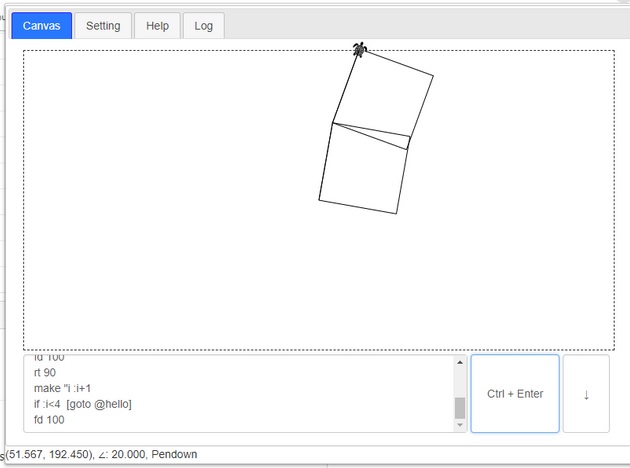
logo-goto-keyword
–EOF (The Ultimate Computing & Technology Blog) —
推荐阅读:生活需要苦难作文550字 热闹的除夕作文 心如止水,乱则不明 校园的竹林作文 视频内容如何提高搜索引擎优化排名 Google SEO优化,4个“另类”的排名方法 商城系统建设心得,轻松搞定选择困难 什么是PPC?为什么你会用到它? SEO网站优化能为你带来那些好处? 高级SEO思维详细解读
- 评论列表
-
- 添加评论