取消Windows Server 2008 R2密码过期提示
- 时间:2025-05-24 23:18:15
- 分类:网络文摘
- 阅读:102 次
在之前的文章“windows server 2008 r2到windows 7的改造之路”中,我提到过将windows server 2008 r2调整得像windows 7一样,并且使用效果非常好,甚至更好。然而,今日启动系统时,出现了“考虑更改密码,密码将在5天后过期”的提示。这让我意识到,在改造过程中,我忽略了windows server 2008 r2的administrator账户的密码过期设置,这是一个疏忽。
 alt="取消Windows Server 2008 R2密码过期提示" />根本原因在于没有为当前账户启用“永不过期”的密码选项。此外,这个提示是由组策略设置的,如下图所示:
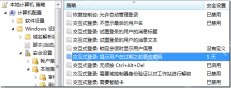 alt="取消Windows Server 2008 R2密码过期提示" />要禁用此功能,请打开“服务器管理器”:
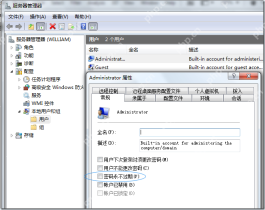 alt="取消Windows Server 2008 R2密码过期提示" />然后按照上图指示,进入配置---本地用户和组---用户---administrator,打开属性窗口,并选择“密码永不过期”选项,这样就可以解决问题了。
Beginner’s Introduction to PHP Memcached Using the Regular Expression to Replace External Links in WordPr 5 Smart Guides In Taking The Best Hosting Provider Checking Subtree of Another Tree using Preorder Traversal or Rec How to Optimize WordPress Website for Speed? How to Compute the Day of the Week using C++? Counting Substrings with Only One Distinct Letter with Different Ukranian Authorities Prevent Security Blogger From Getting Kidna 5 Instagram Tools to Help You Get More Blog Visitors 6 SEO Analysis Tools Every SEO Needs to Know For 2017
- 评论列表
-
- 添加评论