Reclaiming the Disk Space by Deleting the Logs of the Docker Con
- 时间:2020-10-07 14:14:07
- 分类:网络文摘
- 阅读:151 次
The Steem Blockchain is huge and currently it has over 47 Million blocks and still growing!
To run a steem witness, you will need at least 16GB RAM and at least 1TB HDD/SSD. The blockchain size is currently over 300GB, and imagine you would need to restore from backup instead of replaying/reindexing the whole blockchain which takes weeks, a large Disk would certainly help.
If your Steem Node (Using the Docker Container: SIAB: Steem-In-A-Box) is running for months, you will have lots of the logs written – which you can truncate and reclaim the lost space.
First, go to the container directory – which is located at /var/lib/docker/containers/.
Then for example, the log is the -json.log file – which you can locate them by find . -name “*.log” -type f -size +100M to list log files that are larger than 100M.
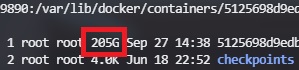
Then, we can just truncate the log file (do not simply remove it otherwise the logs will be stopped writing) – However, if you don’t want the logs at all – this is a good way to avoid logs eating your disk space. You can always restart the container to resume the log writing after the log files have been removed.
1 | echo "" > log_file-json.log |
echo "" > log_file-json.log
–EOF (The Ultimate Computing & Technology Blog) —
推荐阅读:数学题:一个多位数四舍五入后是1亿,这个数最小是多少? 新网站优化对于一个企业来说到底有多重要 大学生如何在渗透测试行业立足 网站渗透测试中的历程经验记录分析 百度推出的“鸿雁计划”到底有什么用?对站长有哪些影响? 如何构建高质量的网站? 2020年SEO优化应该注意哪些细节?新手必看 运营笔记:花5分钟看完这篇文章,保证让你立马学会写运营方案 网站不收录的原因及解决方法 企业新站优化做的不好怎么办?
- 评论列表
-
- 添加评论