How to Modify the Git Commit Messages After Your Push Your Branc
- 时间:2020-10-07 14:38:56
- 分类:网络文摘
- 阅读:143 次
Git is a popular and widely used version control system. If you stage your local changes and commit it to local branch, you can change the commit message by:
1 | git commit --amend "new message" |
git commit --amend "new message"
If you simply type without the message parameter:
1 | git commit --amend |
git commit --amend
Git will launch a text editor for you to change the commit message. You can edit and then save and exit (usually :wq for vim)
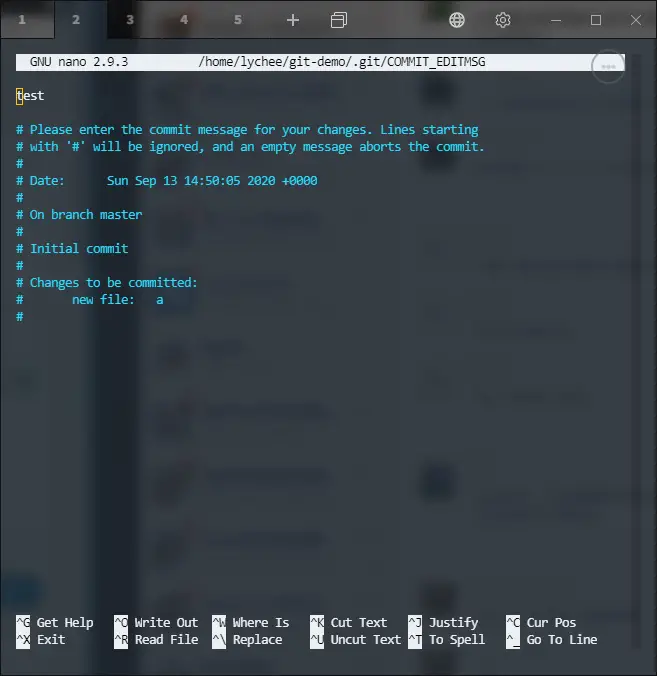
This command only allows you to amend the last commit – if you want to change multiple commit message you can git rebase
For example, you can change the last two commits:
1 | git rebase -i HEAD~2 |
git rebase -i HEAD~2
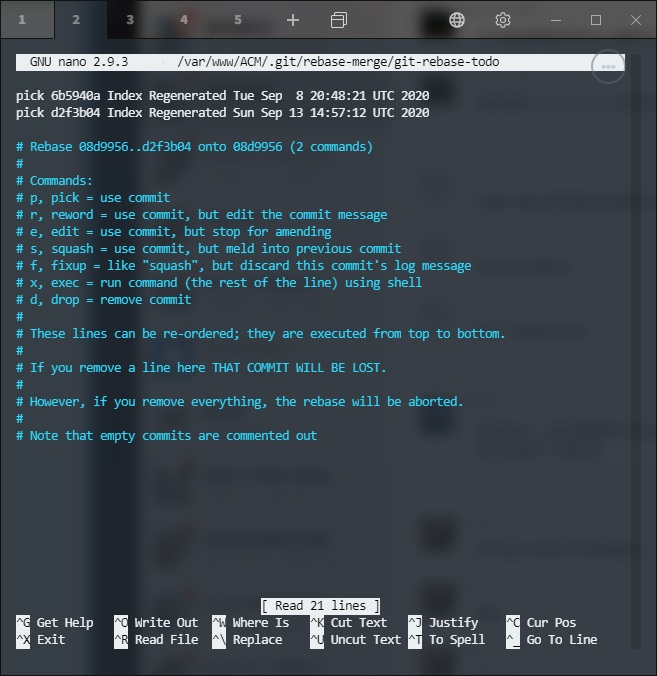
git-rebase-i-commit-message
Then, you can reword, drop, or squash commit messages. You can also exec to run external command for example if you want to reword to a multiline commit message.
Once you have done changing the commit messages, you can git push -f to remote branch.
If you have a messy branch, it is recommended that you git checkout -b NewBranch then git merge MessyBranch, then you can squash your commit message by git commit -m “Squashed new commit message”.
–EOF (The Ultimate Computing & Technology Blog) —
推荐阅读:竹炭食品排毒就是一个忽悠人的概念 中华人民共和国食品安全法(全文) 山东启动打击非法保健食品专项行动 盘点那些不科学不健康的饮食习惯 养生推荐:几种最牛的常见抗衰老食物 营养健康食品系列:休闲干果开心果 营养健康食品:向日葵的种子葵花籽 酿造酒之黄酒和白酒的营养价值 葡萄酒及啤酒的营养保健价值 保健食品广告九成以上虚假违法
- 评论列表
-
- 添加评论